Your Business Looks Professional Until Someone Asks for Your Email Address
A branded email address costs less than a single lunch meeting, and it decides how much of your mail people trust before they open it. The Kenyan guide to business email, the Gmail 2027 deadline, and SPF/DKIM/DMARC in plain language.
A few months ago a Nairobi business owner we'll call Mary sent us a screenshot. It was a supplier's reply to her company email, and the reply was one line: "Kindly confirm you are the one writing this." Mary's emails had been landing in the supplier's spam folder for weeks. Her messages were polite, her prices were right, her invoices were correct. None of it mattered. What mattered was the address they came from: maryjoneskiki2020@gmail.com.
Mary's business had a website, a logo, and a VAT number. But the moment anyone asked for her email address, it looked like a side hustle. That gap, between how professional the business actually is and how professional it looks the second someone reads the sender line, is what this guide closes. It is the cheapest trust problem in Kenyan business, and it is almost always fixable in a day.
Your address is your most-seen piece of branding
Your logo appears on your website, maybe your signboard, occasionally your invoices. Your email address appears on every message you have ever sent and every message you ever will. A customer who has never visited your office has still seen your address dozens of times. That makes it the most repeated piece of branding you own, and most businesses never think about it at all.
Psychologists call the mechanism the framing effect: the same fact lands differently depending on the frame around it. maryjoneskiki2020@gmail.com frames the sender as a person, and a person with a number in their address. hello@marysbakes.co.ke frames the sender as a business with a name and a stake in its reputation. When a buyer is weighing two similar quotes, the frame makes the decision before either salesperson gets to speak. Nobody consciously thinks "this address looks cheap". They just feel a little less sure, and a little less sure is all a competitor needs.
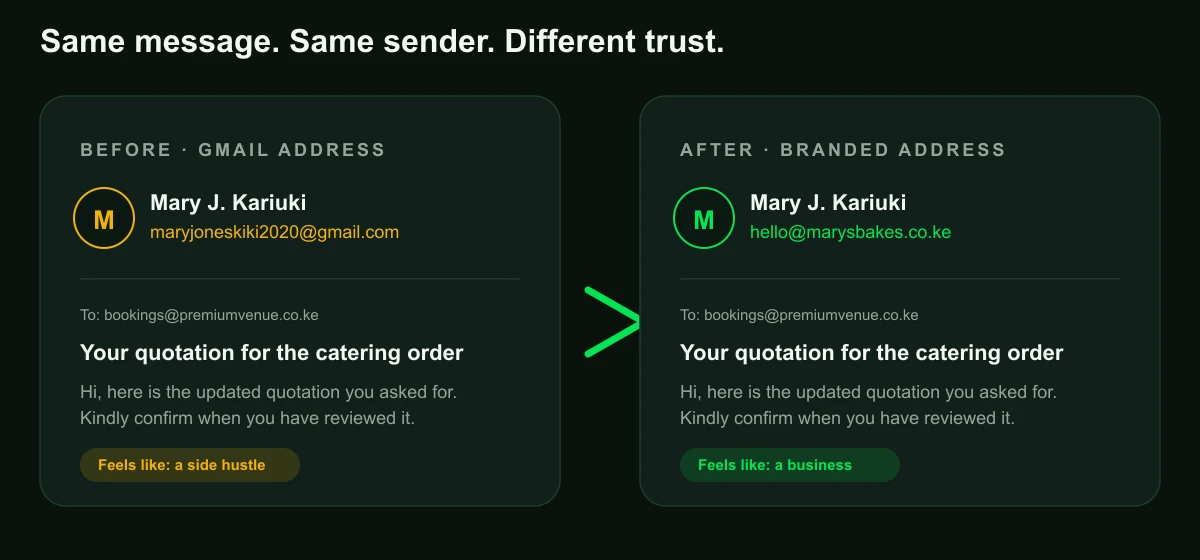
The same logic applies to the team. Your accountant, your salesperson, your receptionist: when they email on your behalf, they are carrying your brand. An address that says the sender works for you changes how much weight their words carry. This is the argument for moving the whole team onto branded addresses, not just the director.
The numbers nobody tells you
Here is where the conversation gets uncomfortable, because the stakes are not just looks. Industry benchmarks put the share of legitimate email that never reaches the inbox at around one in six messages. Not spam: real, wanted mail that would have earned a reply. Roughly eighty-four percent of domains have no DMARC record at all, which means anyone can send mail pretending to be them and most receivers will not even have instructions on what to do with it. And since February 2024, Gmail and Yahoo have required working SPF, DKIM, and DMARC for anyone sending bulk mail, with enforcement only tightening since.
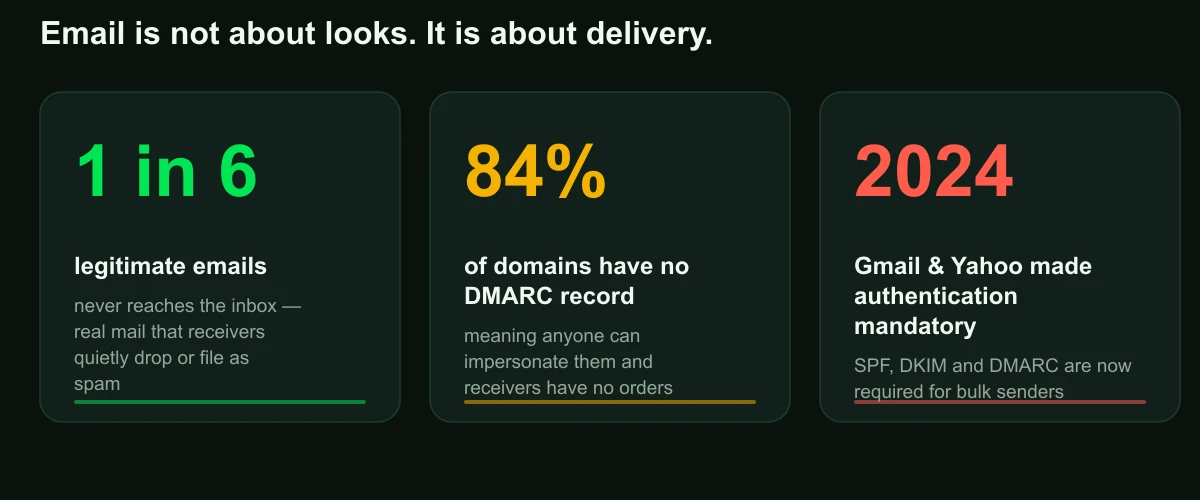
The uncomfortable framing is loss aversion: your email might be working the way a padlock works on a cardboard box. It looks fine, it feels secure, and nothing has tested it yet. The first message that trips a spam filter, whether it is a link, an attachment, or a burst of sends to new recipients, is the test, and the test happens without warning. By the time you notice, a supplier has already quietly decided you are not worth replying to.
Step 1: Own the domain
Every piece of professional email starts with a domain you control. In Kenya that means a .co.ke (or .com, or your preferred extension) registered through an accredited registrar in your own name, with your own contact details, renewable for one to five years. A domain costs a few thousand shillings a year, less than one customer lunch, and it is the one asset in this whole setup that outlives every provider you will ever use.
People who skip this step do not usually skip it on purpose. The most common horror story in Kenyan business is the domain that was registered by someone who no longer works there: the founding developer, the agency that built the site, the friend who "knew about these things". The domain lives under the developer's email address, in the developer's name. The site breaks, the developer is unreachable, and the business discovers it does not own its own identity. This is the endowment effect in reverse: the asset feels like it belongs to you until you try to leave, and then you find out it was never yours.
If you are starting from scratch, register the domain yourself, in your own name, and keep the login in a place your business controls. If you already have a site, check who actually owns the domain before you do anything else. A WHOIS lookup will tell you the registered holder. If it is not you or your company, the fix is a transfer, and it should happen before you spend another shilling on email.
Step 2: Pick the mailbox (and stop paying for the wrong problem)
Once you own the domain, you need a mailbox on it. This is where Kenyan businesses overpay, and the reason is a classic case of mental accounting: people assume the price they pay should match how professional the result looks, so the most expensive option feels safest. In email, the opposite is true. All three tiers below give you a perfectly credible branded address; they differ in storage, polish, and who you are paying to solve which problem.
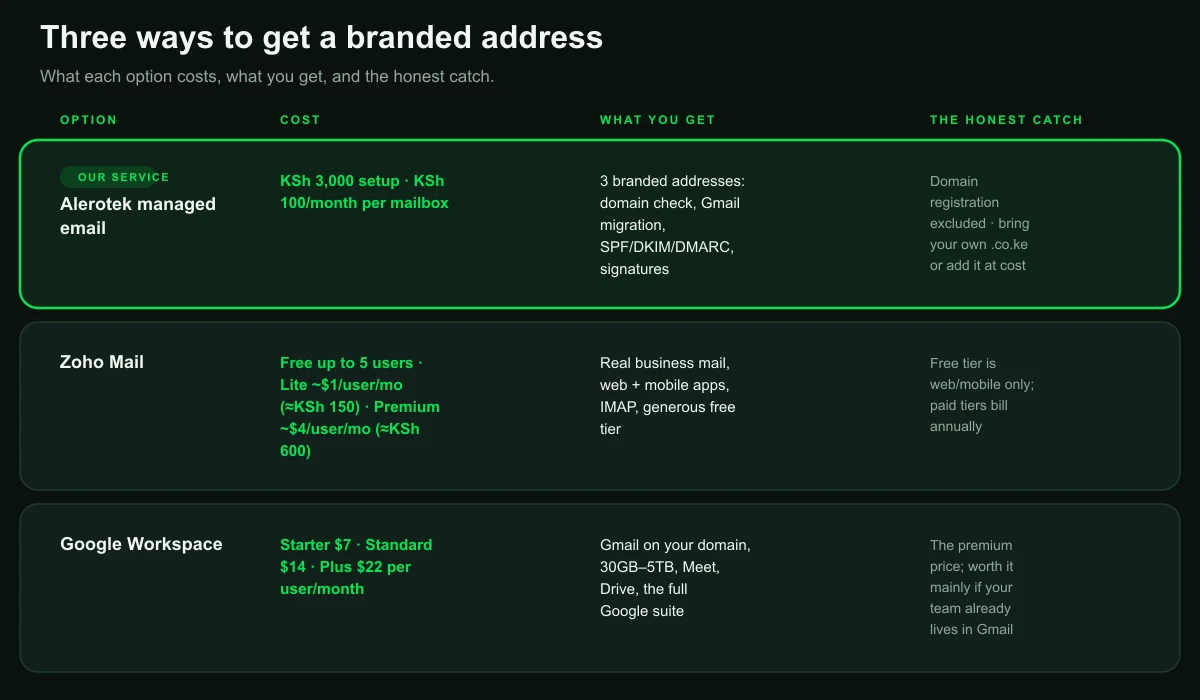
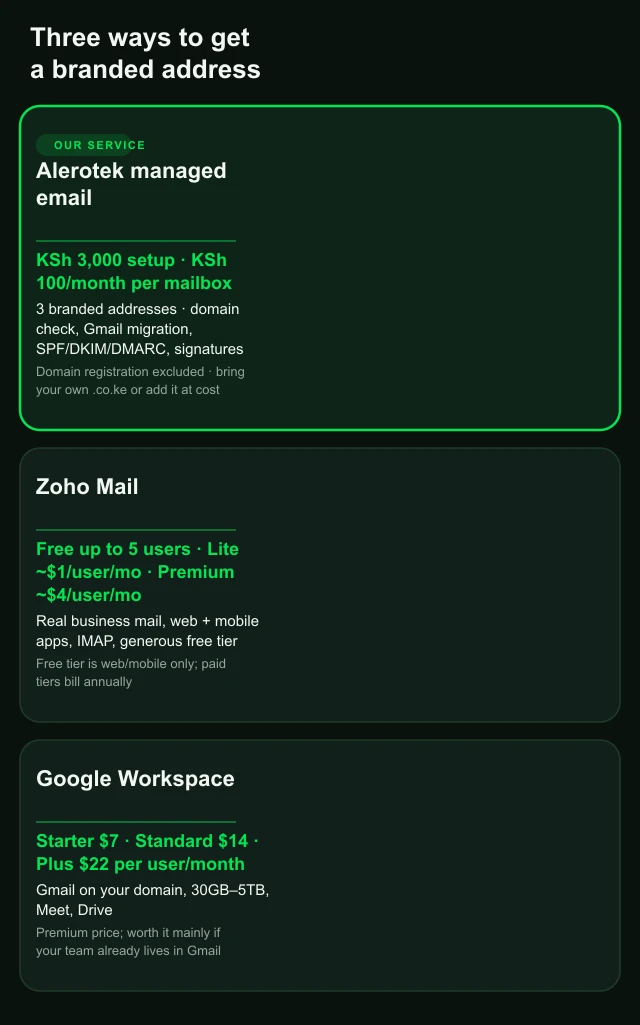
Use mental accounting honestly here: KSh 100 a month per mailbox is the price of a single lunch meeting, and it buys an address that frames you as a business on every message, forever. It also buys the work behind it: three branded addresses, migration from Gmail, the SPF/DKIM/DMARC records and the signatures, all handled in a day for a one-time setup fee. Zoho's free tier is genuinely good if you want to do it yourself, and Zoho Lite costs about KSh 150 a user a month, which makes the managed option the cheaper one once you count your own time. The rule of thumb: pay for the tool that solves the problem you actually have. If your problem is "we look unprofessional", the managed option solves it without a learning curve. If your problem is "our team of twenty needs Google's suite", that is what Workspace is for.
One trick that costs nothing: create alias addresses such as info@, sales@, and accounts@, all landing in one inbox. Customers remember info@ without being told, and you get the reach of a big company with the staffing of a small one.
The Gmail hack has an expiry date: 2027
Here is the section most guides skip, and it is why this one has a deadline in the title. For years, a huge share of Kenyan businesses have run "free" professional email by connecting a third-party service to a free Gmail account, sending as their domain through Gmail's "Send mail as" feature, or pulling mail from elsewhere with Gmailify or POP fetching. It is the workaround everyone used, it costs nothing, and Google is now retiring all of it.
Google's own support pages are explicit: the company is retiring POP fetching, Gmailify, and third-party "Send as". Restrictions begin rolling out in the second half of 2026. New sign-ups for these features are blocked first, then the hammer comes down, and the features are fully removed in January 2027. When that happens, any business running its professional email through a free Gmail workaround loses the setup, possibly without warning, at a moment chosen by Google.
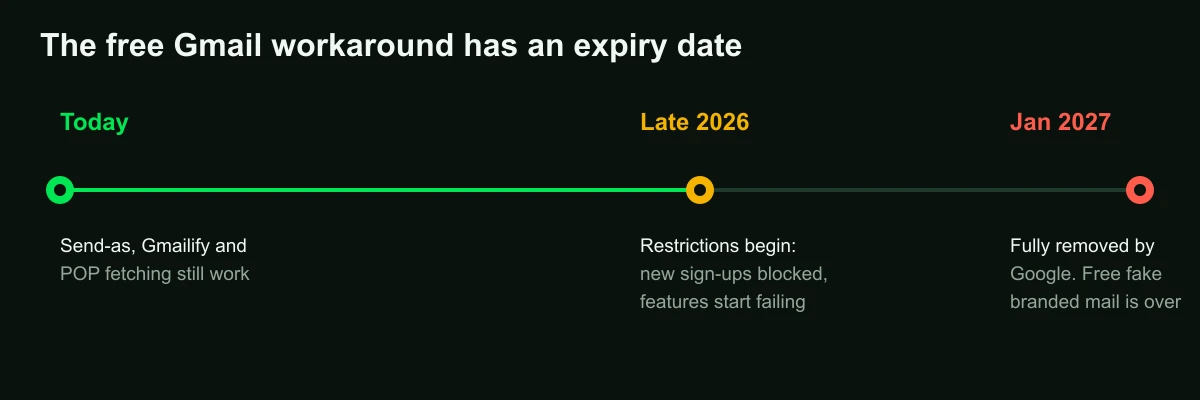
To be fair to the workaround: the Gmail app itself is not going anywhere, and you can still read a real branded mailbox in Outlook, Thunderbird, Apple Mail, or your phone's mail app. What dies is the trick of faking a branded address through a free Gmail account. If that trick is your current setup, the transition is not optional. The only question is whether you do it on your schedule or on Google's. Do it now, while it is a calm migration, not a scramble after the feature stops working mid-quarter.
Email health: the part nobody checks
Once you own a domain and a mailbox, there is a layer underneath that decides whether your mail actually arrives: three DNS records that tell other mail servers whether to trust you. Nobody explains them well, so here they are in plain language.
- SPF is the guest list. It lists which servers are allowed to send mail for your domain. Mail from a server not on the list is suspect.
- DKIM is the wax seal. Your server signs each message with a private key, and receivers check the signature against a public key published in your DNS. A signed message proves it came from you and was not altered in transit.
- DMARC is the bouncer's orders. It tells receivers what to do with mail that fails the other two: watch it, flag it, or reject it.
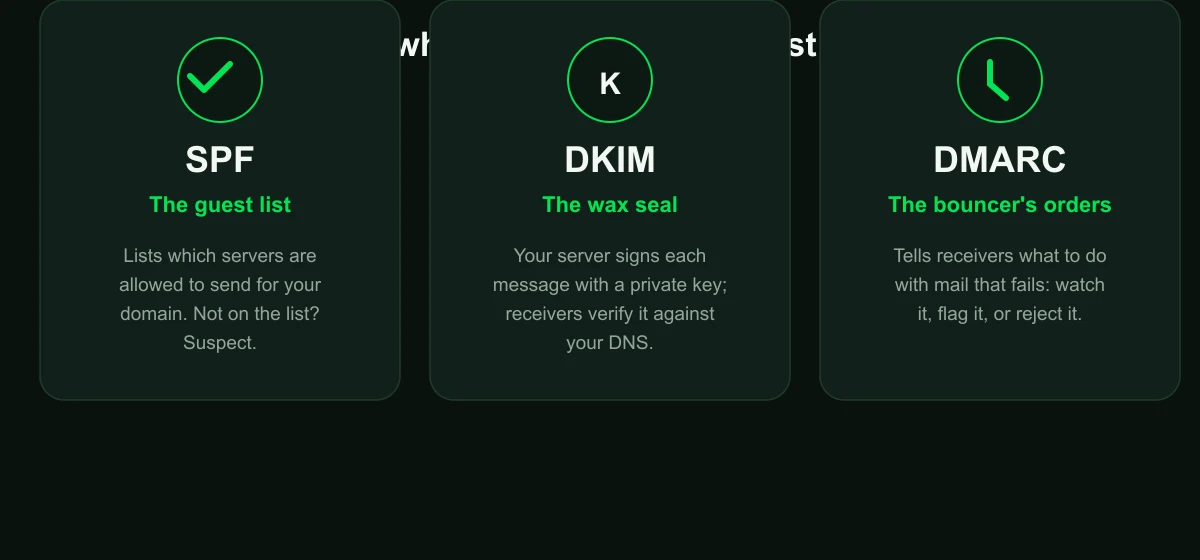
Most Kenyan businesses have never looked at these records, because the mail seems to work, and here is the honest truth about why that is dangerous: receivers accept unsigned mail out of leniency, not certainty. The moment any message trips a spam signal, whether it is a link, an attachment, a new recipient, or a burst of sends, authentication is what decides. Signed mail survives suspicion. Unsigned mail goes to the spam folder. You cannot predict when that will happen, which is why signing is insurance you cannot buy after you need it.
There is also a concrete business case you will feel: forwarding. When someone forwards your email, say a client forwarding your invoice to their accountant, the message no longer arrives from your listed servers, so SPF often fails. DKIM's signature travels with the content, so forwarded mail still verifies. If you already run DMARC at reject (which you should), real mail that fails authentication gets rejected, not spammed. DKIM is what keeps forwarded mail from being one of those rejections.
We ran our own domain through this, and we failed it
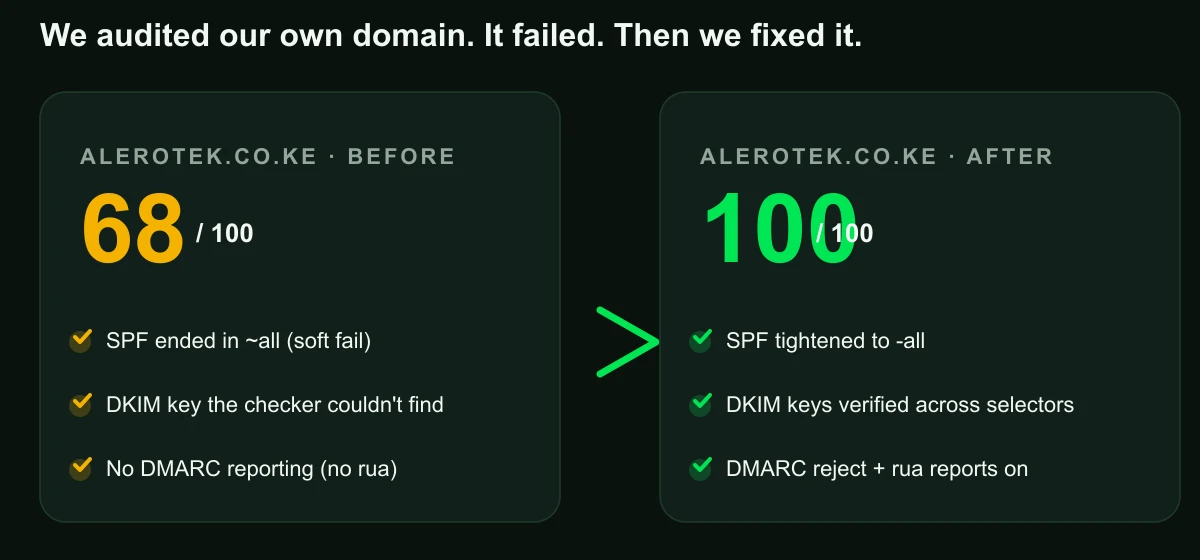
We built a free email health checker, and the first serious domain we ran through it was our own: alerotek.co.ke. It scored 68 out of 100. Our mail worked, our records looked fine, and the checker was right to be suspicious anyway. Three things were wrong, and each is a lesson.
First, our own checker had a blind spot. Providers like Resend, Amazon SES, and Mailgun publish DKIM keys under their own selectors, such as resend._domainkey, and our first version of the checker only probed the common ones, so it reported "no DKIM" for a domain that actually had keys. We fixed the checker to probe the full selector list. The lesson, and the pratfall we own: if you run a checker and it says something is broken, double-check the tool before you touch your DNS.
Second, our SPF was too polite. It ended in ~all, which says "soft fail": essentially "these other servers might send for us, treat them kindly". A domain serious about not being spoofed ends in -all, which says "reject everything not on the list". We tightened it.
Third, we had no DMARC reporting. Our DMARC record told receivers what to do but not where to send reports, so we were flying blind on whether anything was being blocked. We added the rua tag, which directs receivers to send aggregate reports, a security camera for the domain that proves month after month that nothing legitimate is being rejected.
After those three fixes: 100 out of 100. The checker is free and runs entirely in your browser. Your DNS records are looked up live and nothing is stored. Run your own domain through it; it takes fifteen seconds and it tells you, in plain language, exactly which records are missing and what to paste where.
Signatures: the free upgrade you are probably skipping
Once the address and the records are right, there is one more layer that costs nothing and earns trust on every single message: the signature block under your mail. We wrote the full guide on branded email signatures, but the short version is five rules: full name and role, company name and one link, a phone number you actually answer, a small logo at a fixed height, and nothing else. No five phone numbers, no six social icons, no photo that takes twenty seconds to load on mobile data.
A signature that lists three offices and a website directory does not look professional; it looks like an interruption. The signature is the last thing a reader sees, and the peak-end rule says the end of an experience is one of the two moments people remember. End your emails well. Read the full signature guide here.
The four-layer fix, in order
Here is the whole strategy as a build order, each layer on top of the last. Do them in this sequence and each step makes the next one easier.
- Own the domain. Register it yourself or transfer it out of whoever currently holds it. A few thousand shillings a year, and it is the only asset here that never depreciates.
- Put a real mailbox on it. Zoho free or Lite is the sweet spot for most SMEs; Workspace if the team already lives in Google. Add info@, sales@, accounts@ aliases.
- Publish SPF, DKIM, and DMARC, then verify them with a checker. Set DMARC to reject once the other two are passing, and add rua so you can see the reports.
- Fix your signature so the last thing people remember about your mail is a clean, professional close.
The psychology here is commitment and consistency: you do not need to do all four today. Do the first one, checking who owns your domain, and the rest follows, because a business that has already started stops feeling like it is optional. Mary did all four in a week. The supplier's next reply was not "kindly confirm". It was a contract.
The bottom line
Professional email in Kenya is not a luxury line item; it is the cheapest trust upgrade available to a business, and it has a deadline attached. Own the domain, put a real mailbox on it, authenticate the records, fix the signature. The total cost for most businesses is less than one lunch meeting a month, and the payoff is that your mail, from invoices to quotes to follow-ups, stops being doubted before it is read.
This is also the work we do for clients every week, and it is the setup we run ourselves: we migrated our own domain, fixed our own records, and now ours scores 100. If you would rather we do it with you than read about it, message us and we'll take your domain from wherever it is now to fully authenticated professional mail, usually in a day.
It is also a packaged service on our solutions page: branded addresses for the whole team, signatures, and the SPF/DKIM/DMARC records, scoped in one flat conversation.
Want your business email set up properly? KSh 3,000 setup (domain registration excluded), KSh 100 a month per mailbox, three branded addresses, done in a day. We handle the domain check, the migration, the SPF/DKIM/DMARC records and the signatures. Message us on WhatsApp and we'll walk you through it.
Or skip the chat and test where you stand right now: run your free email health check. It takes fifteen seconds, tells you exactly what's missing, and stores nothing. Then you will know which of the four layers you are actually missing.